
The Fireblocks SDK allows you to issue and manage Solana Token 2022 mints through the /v1/tokenization/tokens endpoint. This guide explains how to deploy a new Solana token and interact with it (minting, or other IDL-based instructions).
Note:Tokenization on Solana currently supports only Token 2022 with extensions. Custom templates are only supported on EVM chains. For non-SPL or Token2022 program interactions, see: Interact with Solana Programs.
Overview
Unlike EVM-based networks, Solana token issuance does not require uploading a contract template. The Fireblocks SDK automates deploying the Token 2022 program and creating your token with the parameters you specify.
Prerequisites
- Asset ID: Fireblocks asset ID for Solana (
SOL_TESTfor Testnet,SOLfor Mainnet). - Vault Account ID: The vault that will deploy and manage the token (find it in the Console URL).
WarningThe vault must hold enough SOL to cover transaction fees and rent-exempt balances.
Note:The vault used to issue the token receives the authorities for all Token 2022 extensions.
Step 1: Initialize the Fireblocks SDK
Install:
npm install @fireblocks/ts-sdk
or:
yarn add @fireblocks/ts-sdk
Initialize:
import { Fireblocks, BasePath } from '@fireblocks/ts-sdk';

const fireblocksSdk = new Fireblocks({
  apiKey: 'YOUR_API_KEY',
  secretKey: 'YOUR_PRIVATE_KEY',
  basePath: BasePath.US, // Use BasePath.EU if applicable
});
Step 2: Issue a New Solana Token
const deployResponse = await fireblocksSdk.tokenization.issueNewToken({
  createTokenRequestDto: {
    vaultAccountId: '0', // Vault account ID that will manage the token
    createParams: {
      name: 'My Solana Token',
      symbol: 'MST',
      decimals: 9, // Solana tokens typically use 9 decimals
    },
    assetId: 'SOL_TEST', // or 'SOL' for Mainnet
  },
});

console.log('Token deployment initiated:', deployResponse);
You’ll receive a TokenLinkDto that references your deployed token. Monitor its status (PENDING → COMPLETED or FAILED) via the token link endpoint.
Note:The deploying vault receives the mint and extension authorities (transferable later via
setAuthority).
Step 3: Interact with the Token (Minting Example)
3.1 Fetch the Token’s IDL
const tokenLink = await fireblocksSdk.tokenization.getLinkedToken({
  id: deployResponse.id,
});

const idl = await fireblocksSdk.contractInteractions.getDeployedContractAbi({
  contractAddress: tokenLink.tokenMetadata.contractAddress,
  baseAssetId: 'SOL_TEST',
});
3.2 Create a Mint Instruction
const mintToCheckedInstruction = idl.data.abi.find(
  (func) => func.name === 'mintToChecked'
);

// Example instruction (populate addresses/values as needed):
const mintInstruction = {
  name: 'mintToChecked',
  accounts: [
    { name: 'mint', writable: true, address: 'MINT_ADDRESS' },
    { name: 'token', writable: true, address: 'RECIPIENT_TOKEN_ACCOUNT_ADDRESS' },
    { name: 'mintAuthority', signer: true, address: 'YOUR_MINT_AUTHORITY_ADDRESS' },
  ],
  args: [
    { name: 'amount', type: 'u64', value: '1000000000' },
    { name: 'decimals', type: 'u8', value: 9 },
  ],
};
Note:Some IDL fields may be pre-populated (e.g.,
decimals,mint). If the recipient lacks a token account for this mint, Fireblocks can create one when you pass the base asset wallet address.
3.3 Execute the Mint Transaction
const mintResponse = await fireblocksSdk.contractInteractions.writeCallFunction({
  contractAddress: tokenLink.tokenMetadata.contractAddress,
  baseAssetId: 'SOL_TEST',
  writeCallFunctionDto: {
    vaultAccountId: '0',
    abiFunction: mintInstruction,
  },
});

console.log('Minting tokens initiated:', mintResponse);
You’ll get a Fireblocks Transaction ID to poll for status.
Update Solana Token Metadata
The Fireblocks SDK allows you to modify on-chain metadata for Solana Token 2022 mints without requiring a redeployment. This is useful for correcting or updating the token's name, symbol, or URI pointer.
Prerequisites
- Asset ID: Fireblocks asset ID for Solana (
SOL_TESTfor Testnet,SOLfor Mainnet). - Metadata Update Authority: The Vault account assigned as the update authority must execute these changes.
- SOL Balance: The vault must hold enough SOL to cover transaction fees.
Step 1: Access Token Management
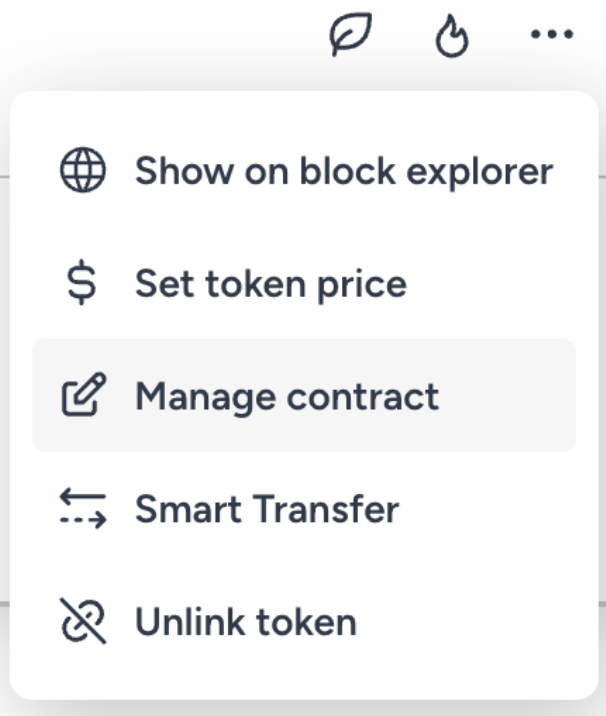
Navigate to the token in the Fireblocks Console and select Manage contract from the token's action menu.
Step 2: Configure Metadata Update
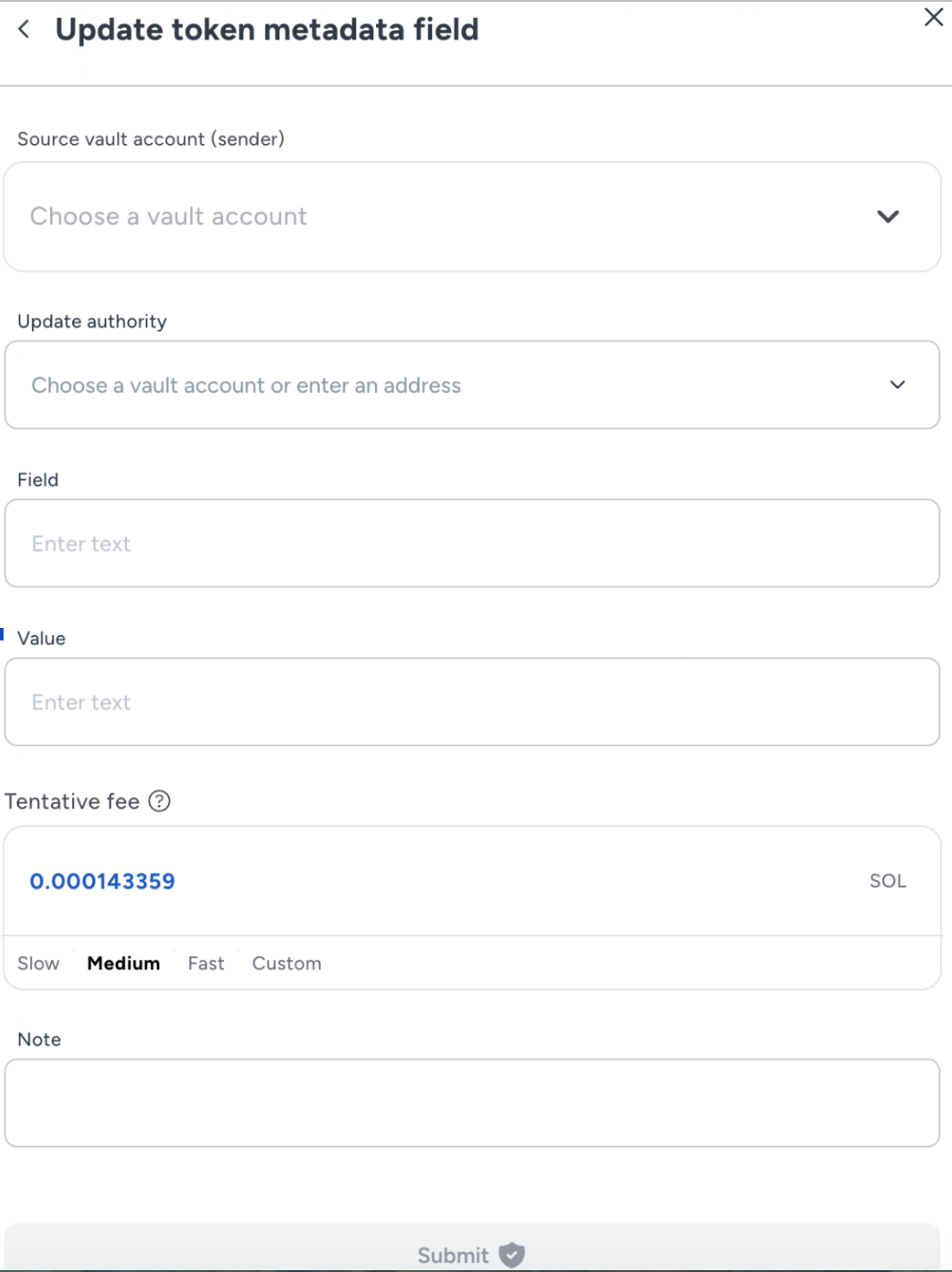
Navigate to WRITE and select Update Token Metadata Field. Provide the following parameters in the function interface:
- Source Vault Account: The Vault account holding the Metadata Update authority.
- Update Authority: The Vault account or address holding Metadata Update authority.
- Field: The specific metadata field to update (e.g.,
Name,Symbol, orUri). - Value: The new string value for the selected field.
Step 3: Execute Transaction
Select Submit to initiate the on-chain update. Once completed, the updated field will be reflected on-chain.
Explorer Compatibility & JSON Format
Solana explorers (specifically for Token-2022) prioritize off-chain metadata fetched via the URI over on-chain fields. To avoid "Unknown Token" errors, ensure your URI points to a valid JSON object.
Required JSON Structure:
{
  "name": "Your Token Name",
  "symbol": "SYM",
  "description": "A brief description of the token",
  "image": "https://<your-storage-provider>/ipfs/<image-hash>"
}Notes:
- Propagation Delay: Changes to on-chain fields or URI content may take 24-48 hours to appear consistently across all explorers.
- Hosting: Use permanent storage like IPFS (via Pinata or NFT.Storage) or a managed HTTPS endpoint to ensure metadata remains reachable.
- Common Failures: Ensure the URI points to the JSON metadata document itself, not directly to an image file.
Supported Token-2022 Extensions
- Metadata – Attach and update metadata
- Transfer hook – Execute custom logic per transfer
- Metadata pointer – Reference external metadata sources
- Interest bearing – Accrue interest over time
- Default account state – Set default token account state
- Mint close authority – Securely close the mint account
- Transfer fee config – Apply dynamic transfer fees
- Permanent delegate – Assign a permanent delegate
Note:The issuing vault initially holds authority over all extensions.
Limitations
- The deploying vault receives all extension authorities; transfer with
setAuthorityif needed. - Tokenization does not support custom data types or string encoding in IDL; such instructions won’t appear.
- For custom types/strings, serialize the program data and submit via the
Transactions API.
Reference Models
TokenLinkDto (high-level)
id– Fireblocks-generated token link IDstatus–PENDING|COMPLETED|FAILEDdisplayName– Human-readable nametokenMetadata– Details like mint/ABI/IDL info